
How to Get Started with AI Agents: A 30-Day Playbook for Business Owners
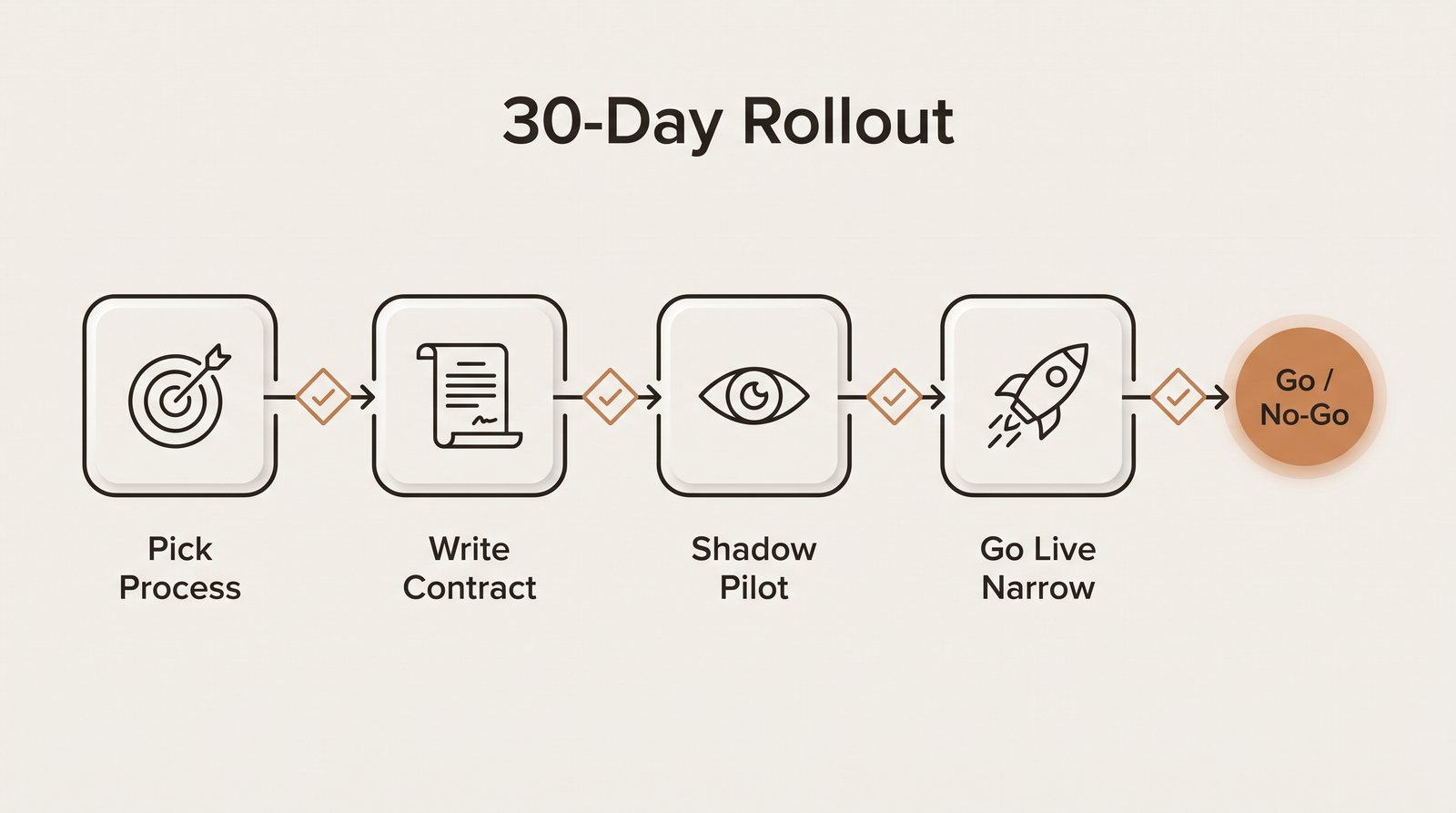
Start with one process, not a platform. Week 1: score candidate tasks on volume, rule clarity, cost of error, and data access, then pick the winner. Week 2: write a one-page agent contract covering the goal, allowed tools, hard limits, and handoff triggers. Week 3: run the agent in shadow mode while a person approves every output. Week 4: go live on a narrow slice with a kill switch, then decide go or no-go against numbers you wrote down on day one. Gartner expects over 40% of agentic AI projects to be canceled by the end of 2027 (Gartner, June 2025). The gates in this plan exist to keep yours out of that group.

Most owners who ask us how to get started with AI agents have already read the explainers. They know an agent is software that can take steps on its own, call tools, and decide what to do next. If you want that background, our business owner’s guide to AI agents covers it. The harder question comes after that: what do you do on Monday morning?
This playbook answers that. It runs four weeks, and each week ends with a gate. If you can’t pass the gate, you stop or you fix something before moving on. That sounds slow. It’s faster than spending a quarter on a pilot that nobody can prove worked.
Why Start With a 30-Day Plan Instead of a Big Rollout?
Because the odds favor small, measured bets. In June 2025 Gartner predicted that over 40% of agentic AI projects will be canceled by the end of 2027, pointing to escalating costs, unclear business value, and inadequate risk controls. The same release estimated that only about 130 of the thousands of vendors marketing “agentic” products offer real agent capabilities. Gartner calls the rest “agent washing”: chatbots and old automation tools with a new label.
Look at those three causes again. Cost, value, risk. Each one is a planning failure, and planning is cheap. A 30-day plan forces you to name the value up front, cap the cost, and set the risk controls before anything touches a customer.
Week 1: How Do You Pick the Right First Process?
Start from a problem you can already measure. A tool you are curious about is the wrong starting point. “Our office manager spends two hours a day typing web leads into the CRM” is a starting point. “We should use AI for sales” is not.
List five to ten tasks that eat staff time or cause errors. Then score each one from 1 to 5 on four factors:
| Factor | What a 5 looks like | What a 1 looks like |
|---|---|---|
| Volume | Happens dozens of times a day or week, so small savings add up | A few times a month |
| Rule clarity | You could write the steps on one page and a new hire could follow them | “It depends,” and only one senior person knows how |
| Cost of error | A mistake is cheap and easy to catch, like a mislabeled ticket | A mistake costs money, a customer, or creates legal or safety exposure |
| Data access | The inputs live in a system with an API, a shared inbox, or a clean spreadsheet | The inputs live in someone’s head, on paper, or behind a portal with no export |
Add the scores. Anything under 12 goes back on the shelf for now. Among the rest, pick the one with the best cost-of-error score, even if another task has more volume. Your first agent is as much about teaching your team how to run agents as it is about savings. A forgiving process gives you room to learn.
Typical winners for a small or mid-size company: lead intake and routing, matching invoices to purchase orders, rescheduling appointments, and first-pass sorting of support email. Our post on five AI agent use cases that pay back goes deeper on each.
Before the week ends, record the baseline. How many times does this task happen per week? How long does each one take? What is the current error rate? Get a week of real numbers if you can, even if someone counts by hand on a notepad.
Gate 1: You have one process, a score of 12 or higher, a named owner who does this work today, and a written baseline. Missing any of the four? Don’t start week two.
Week 2: What Goes Into an Agent Contract?
An agent contract is a one-page document that says what the agent is for and what it may never do. You write it before anyone builds anything. It becomes the spec for whoever builds the agent, the test plan for week three, and the rulebook for your team.
It has four parts.
1. The goal
One sentence with a measurable outcome. “Create a complete CRM record for every web form lead within 10 minutes, with the correct service line and territory assigned.” Keep it to one outcome. A second goal means a second agent, later.
2. Allowed tools
List every system the agent can touch and whether it can read, write, or both. For a lead-intake agent: read the web form inbox, read and write contacts in the CRM, read the territory spreadsheet. Nothing else. If you’re building on a protocol like MCP, this list maps to the tool permissions you grant. Our step-by-step MCP guide shows how that wiring works.
3. Hard limits
Things the agent must never do, in plain words. Never send an email to a customer. Never delete a record. Never quote a price. Never change a record older than 30 days. Build these into the permissions where you can, not just the instructions. An agent that has no delete permission can’t delete anything, no matter what it gets confused about.
4. Human-handoff triggers
The conditions that make the agent stop and hand the item to a person. Common ones: the input is missing a required field, the agent’s own confidence is low, the request mentions a complaint, a refund, or a lawyer, the dollar amount is over a set limit, or the same customer shows up twice in an hour. Every trigger needs a destination, such as a named person or a shared queue someone checks.
Anthropic’s engineering team makes a point in its guide to building effective agents that fits here: start with the simplest setup that works, and add autonomy only when it clearly improves results. If your contract describes a fixed sequence of steps with no real decisions in it, you may want a plain workflow in a tool like n8n or Make, not an agent. That is a fine outcome. Our n8n vs Make vs Zapier cost comparison helps you pick the platform either way.
Gate 2: The process owner and whoever is accountable for the budget have both signed the contract. The builder confirms every tool in it is reachable.
Week 3: How Do You Run a Shadow-Mode Pilot?
In shadow mode the agent does the whole job, but its output lands in a review queue instead of in front of a customer or in your system of record. A person looks at each item and marks it one of three ways: approved as is, approved after edits, or rejected.
That simple tag gives you everything you need. Track three numbers through the week:
- Accuracy: the share of outputs approved with no edits. Count edited items separately, since a draft that needed a one-word fix is a different story from one that needed a rewrite.
- Handoff rate: the share of items the agent sent to a human on its own, under the triggers in your contract. Too high and the agent isn’t saving much. Near zero can be a warning sign too, because it may mean the triggers aren’t firing when they should.
- Time saved: baseline minutes per item minus the minutes your reviewer now spends per item. Time the review too. If checking the agent’s work takes as long as doing the work, you haven’t saved anything yet.
Read the rejected items as a group at the end of each day. They usually cluster. Maybe the agent keeps misreading one form field, or one territory rule is ambiguous. Fix the instructions or the contract, not the individual outputs, and note what you changed so the numbers stay honest.
Set your pass marks before the week starts, not after you see results. What those marks should be depends on the cost of error you scored in week one. A lead-routing agent might pass at 90% accuracy with edits counted as passes. An agent touching invoices should clear a higher bar.
Gate 3: The agent hits the accuracy and time-saved targets you set in advance, on at least a full week of real volume, and no hard limit was breached.
Week 4: How Do You Go Live Without Losing Control?
Go live narrow. Pick a slice of the work: one service line, one location, one lead source, or the first half of each day. The rest keeps running the old way. This gives you a live comparison and limits the damage if something goes wrong.
Three controls must be in place on day one:
- A kill switch. One action, documented and tested, that stops the agent and routes all work back to people. The process owner should be able to trigger it without calling a developer. Test it before launch.
- Logging. Every action the agent takes, with the input it saw and what it did, kept somewhere you can search.
- A weekly review. Thirty minutes with the owner and the builder. Look at the three numbers, a sample of outputs, and every handoff. Keep sampling outputs even when the numbers look good.
At the end of the week, run the go/no-go checklist:
| Question | Go if |
|---|---|
| Did live accuracy hold at or near shadow-mode accuracy? | Within a few points, with no new error types |
| Is time saved real, measured against the week 1 baseline? | Yes, after counting review and exception time |
| Were any hard limits breached? | None |
| Did every handoff reach a person and get resolved? | Yes, none sat unanswered |
| Do you know the monthly running cost? | Yes, and it is lower than the labor value saved |
| Does the owner want to keep it? | Yes. Their buy-in matters more than any metric |
All yes? Widen the slice step by step over the next month, repeating the review each time. One or two no’s? Stay narrow and fix them. Mostly no? Shut it off, write down what you learned, and go back to your week-one list. A clean no-go after 30 days costs you far less than a zombie project that runs for a year. For the math on whether the savings justify scaling, see our breakdown of AI automation ROI for small business.
Should You Build, Buy, or Hire an Agency?
Decide after week two, once the contract tells you what you need. There are three paths.
| Path | Fits when | Watch out for |
|---|---|---|
| Buy (an agent feature in software you use, or a specialist product) | The process is common, like support triage or scheduling, and a product already handles it | Agent washing, weak handoff controls, and data you can’t export if you leave |
| Build in-house | The process is specific to how you work and someone on staff can maintain it after launch | The builder becomes a single point of failure; maintenance time gets underestimated |
| Agency or partner | You need a custom build but don’t have the staff to build and support it | Vague scopes and no handover plan. Insist on owning the accounts, prompts, and logs |
Some evidence tilts toward outside help for first projects. MIT NANDA’s State of AI in Business 2025 research found that AI tools built with external partners reached deployment about 67% of the time, against about 33% for internal builds. The authors add a fair caveat: those are self-reported outcomes, and companies that choose partners may differ in other ways. Read it as a nudge to be honest about your in-house capacity. It does not prove partners are better.
When you evaluate vendors, ask them to walk through your agent contract. Can their product enforce your hard limits through permissions? Can it route handoffs to your people? Can you see a log of every action? If a vendor stalls on those three questions, you are probably looking at a relabeled chatbot.
What Are the Most Common Failure Modes?
The gates in this plan target three common failures.
Scope creep
The pilot works, and someone asks, “Can it also answer the phone? And do quotes?” Each addition resets your accuracy numbers and adds risk you haven’t tested. Say yes to the idea and put it on the week-one list for the next agent. One agent, one goal.
No owner
If nobody’s job includes the agent, nobody reviews the handoffs, nobody reads the logs, and nobody notices when accuracy slides after a software update. The owner should be the person who did the work before, not IT by default. They know what a wrong answer looks like.
No baseline
Without week-one numbers, “it seems to be helping” is the best anyone can say. That answer won’t survive a budget review, and it’s exactly the “unclear business value” Gartner lists as a leading reason projects get canceled. A notepad tally from one ordinary week beats a guess.
Frequently Asked Questions
How long does it take to get a first AI agent into production?
About 30 days for one narrow process, if you already have the data access sorted. Spend week one choosing the process, week two writing the agent contract, week three running it in shadow mode where a human approves every output, and week four going live on a limited slice of the work.
What is the best first process to give an AI agent?
A high-volume task with clear rules, a low cost when the agent gets it wrong, and data the agent can reach through an API or a shared inbox. Lead intake, invoice matching, appointment rescheduling, and first-pass support triage usually score well. Anything involving pricing exceptions, legal commitments, or patient care decisions should wait.
What is shadow mode for an AI agent?
Shadow mode means the agent does the full task but nothing it produces reaches a customer or a system of record until a person approves it. You record whether each draft was accepted as is, edited, or rejected, which gives you an accuracy rate and a handoff rate before any risk goes live.
Should a small business build its own AI agent or buy one?
Buy when a proven product already covers the process, build when the process is specific to how you operate and you have someone to maintain it, and bring in an agency when you need a custom build but lack the staff. MIT NANDA’s 2025 research found externally partnered AI projects reached deployment about twice as often as internal builds, though the authors caution that the gap may reflect the organizations more than the approach.
Why do so many agentic AI projects get canceled?
Gartner predicted in June 2025 that over 40% of agentic AI projects will be canceled by the end of 2027, citing escalating costs, unclear business value, and inadequate risk controls. In smaller companies the same pattern shows up as scope creep, no named owner, and no baseline to measure against.
Key Takeaways
- Pick one process from a measurable problem. Score candidates on volume, rule clarity, cost of error, and data access, and record a baseline before building.
- Write a one-page agent contract: goal, allowed tools, hard limits, and handoff triggers. Enforce limits through permissions, not just instructions.
- Run a shadow pilot for a full week and track accuracy, handoff rate, and time saved against targets set in advance.
- Go live on a narrow slice with a tested kill switch, action logs, and a weekly review. Then run the go/no-go checklist.
- Gartner expects over 40% of agentic AI projects to be canceled by 2027. Scope creep, no owner, and no baseline are how that happens in a small company.
Agents are only one side of it. If customers now find you through Google AI Mode instead of a list of links, our guide to how Google AI Mode picks and cites sources covers what to change on the site itself.
Want a second opinion on which process to start with? Talk to our team. We’ll help you score your candidates and draft the agent contract, whether you end up building it yourself or not.
Written by The WinTech Desk, WinTechnology Inc. | https://www.wintechnology.ai


